

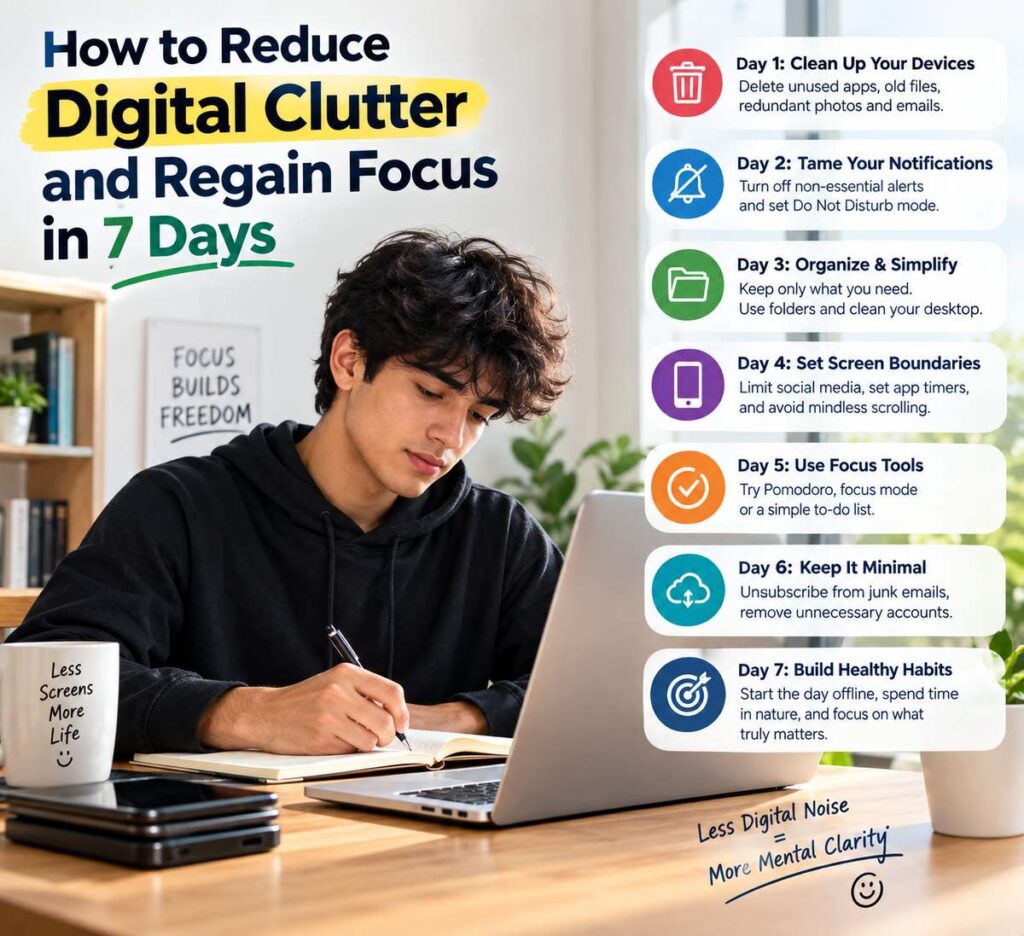
Open your phone right now and look at it honestly. How many apps do you have? How many unread emails are waiting? How many photos and screenshots sit in your gallery that you will never look at again? How many notifications have interrupted you today? For most people, the answers are uncomfortable. Our devices were meant to make life simpler, yet they often add a constant layer of noise. A digital declutter is a practical way to clear that noise, protect your attention and bring some calm back to your daily life.
This guide gives you a simple seven-day plan. Each day takes fifteen to thirty minutes, and by the end of the week your phone, computer, inbox and habits will feel lighter. We will also explain why digital clutter matters, which tools help, how to maintain the results and how to handle common obstacles.
What Is Digital Clutter?
Digital clutter is anything on your devices or online accounts that is unnecessary, disorganised or distracting. It includes:
- Unused apps and old games
- Thousands of photos, screenshots and duplicate files
- Overflowing email inboxes and promotional newsletters
- Constant notifications from apps you barely use
- Messy desktop screens filled with random files
- Dozens of open browser tabs
- Social media feeds that make you feel drained or anxious
- Old accounts and subscriptions you have forgotten
Unlike physical clutter, digital clutter is invisible to others, so we let it grow. But it still affects us.
Why Digital Clutter Matters
You might wonder whether a messy phone is really a big problem. Here is why it deserves attention.
It steals focus. Every notification interrupts your concentration. Research on attention suggests that after an interruption, it can take a while to return fully to what you were doing. Frequent alerts fragment your day.
It wastes time. Searching for a document, photo or email in a chaotic system can consume many minutes every day. Over months, that adds up to hours.
It increases stress. An inbox with thousands of unread messages can create a low-level sense of being behind. A cluttered home screen adds visual noise.
It affects sleep. Late-night scrolling and notifications can interfere with rest.
It slows devices. Full storage and too many background apps can make phones and laptops sluggish.
It affects security. Old accounts, unused apps and outdated software can expose you to privacy risks.
Cleaning up is not about becoming a minimalist or abandoning technology. It is about using technology intentionally.
Before You Begin: Prepare for the Seven Days
A little preparation makes the plan smoother.
- Choose a start date. Pick a week when you are not travelling or facing major deadlines.
- Back up important data. Save essential photos, documents and contacts to cloud storage or an external drive before deleting anything.
- Set a timer. Work in short sessions so you do not get overwhelmed.
- Note your baseline. Check your phone’s screen time report and write down your daily average and most-used apps. You will compare it at the end.
- Decide your goals. Do you want more focus, less scrolling, better sleep or more free time? Write it down.
Day 1: Clean Your Home Screen and Apps
Start with what you see most often: your phone’s home screen.
- Keep only the apps you use daily on the first screen, such as calls, messages, maps, camera, notes and one or two essentials.
- Move other apps into simple folders like “Finance,” “Travel,” “Health” and “Tools.”
- Remove social media and entertainment apps from the first page so they are less tempting.
- Choose a plain, calm wallpaper. Busy backgrounds add visual noise.
- Arrange apps so your most useful ones are within easy reach.
This step takes about fifteen minutes and immediately makes your phone feel more organised.
Day 2: Take Control of Notifications
Notifications are designed to grab your attention. Today, you decide which ones deserve it.
- Open your phone’s notification settings.
- Turn off notifications for shopping apps, games, news alerts you do not need and most social media apps.
- Keep alerts for phone calls, important messages, calendar reminders, banking or security alerts and essential work apps.
- Turn off red badge counters on non-essential apps.
- Use “Focus” or “Do Not Disturb” modes during work, meals and sleep.
- Group non-urgent notifications into a daily summary if your phone allows it.
You will probably feel the difference within hours. Fewer buzzes mean fewer interruptions and a calmer mind.
Day 3: Delete Unused Apps
Every app on your phone consumes storage, may run in the background and clutters your screen. Ask yourself a simple question about each one: “Have I used this in the last three months?”
- If the answer is no, delete it.
- If it is a seasonal app, such as one for a travel platform, remove it and reinstall when needed.
- If you have multiple apps that do the same job, keep the best one.
- Check for pre-installed apps you can disable or hide.
- Review app permissions and remove access to location, contacts or microphone for apps that do not need it.
Do not worry about losing something important. You can reinstall almost any app in seconds.
Day 4: Organise Photos, Videos and Files
Photo galleries and download folders grow silently. Set aside thirty minutes for this task.
Photos and Videos
- Delete blurry images, accidental shots and duplicates.
- Remove old screenshots you no longer need.
- Clear large videos you do not plan to watch again.
- Create albums for key categories such as family, travel and documents.
- Back up favourite memories to cloud storage or a hard drive.
- Consider printing a few special photos.
Files and Downloads
- Empty the downloads folder after moving anything important.
- Create simple folders like “Work,” “Personal,” “Finance” and “Study.”
- Use clear file names, such as “Rent Agreement 2026,” instead of “Document final 2.”
- Clean the desktop of your computer. A tidy desktop reduces distraction.
Do not aim for perfection. A simple system you can maintain is better than a complicated one you abandon.
Day 5: Tame Your Inbox
Email can become a dumping ground. Today, work on making it manageable.
- Unsubscribe from newsletters and promotions you never read. Scroll through recent emails and unsubscribe from the top offenders. Use the unsubscribe link in each message.
- Create filters and labels. Automatically sort receipts, bills, newsletters and work emails.
- Archive old messages. You do not need to delete everything, but move older items out of your main view.
- Use the two-minute rule. If a reply takes under two minutes, do it right away.
- Star or flag truly important items. Avoid marking everything as urgent.
- Aim for a manageable inbox. Inbox zero is a nice goal, but a small, well-organised inbox is enough.
- Set specific times to check email. Instead of constantly refreshing, choose two or three times per day.
If you have thousands of unread emails, consider archiving everything older than a few months and starting fresh. Search still lets you find anything important later.
Day 6: Clean Up Social Media
Social platforms can inspire and connect us, but they can also trigger comparison, worry and wasted time. Take an honest look at your feeds.
- Unfollow or mute accounts that make you feel anxious, envious or angry.
- Follow accounts that teach you something, make you laugh or genuinely inspire you.
- Leave groups and communities that no longer serve you.
- Review your privacy settings and who can see your posts.
- Clear old, unnecessary posts if you wish.
- Remove social apps from your phone for a day and notice how you feel.
- Set daily time limits with built-in screen-time tools.
The goal is not to quit social media, unless you want to. It is to shape it so that it adds value instead of draining energy.
Day 7: Set Healthy Screen Rules and Habits
The final day is about turning your cleanup into lasting habits. Decide on a few simple rules.
- No phone during meals. Enjoy food and conversation.
- No screens 30 to 60 minutes before bed. Read a book or listen to calming music instead.
- Charge your phone outside the bedroom or at least away from your bed.
- Create tech-free zones. For example, the dining table or bedroom.
- Schedule phone-free time. Even one hour a day helps.
- Use “grayscale” mode in the evening to make your screen less stimulating.
- Set an intention before unlocking your phone. Ask yourself why you are picking it up.
Write down your rules and place them somewhere visible. Tell a friend or family member so they can support you.
Bonus Cleanup Tasks
If you have extra time, consider these additional steps:
- Clean your browser. Close unused tabs, clear bookmarks you no longer need and remove unwanted extensions.
- Update passwords. Use a password manager to store strong, unique passwords securely.
- Review subscriptions. Cancel streaming services, apps or memberships you no longer use.
- Delete old accounts. Close online accounts you have not touched in years.
- Update software. Install updates for security and performance.
- Clear cache and storage. Free up space on your devices.
- Organise contacts. Remove duplicates and outdated entries.
Helpful Tools for Digital Decluttering
You do not need special software, but a few tools can help.
- Built-in screen time and digital wellbeing features for tracking and limiting usage.
- Cloud storage services for backups and organised file access.
- Password managers for safe login management.
- Notes apps and task managers to consolidate lists instead of scattering them.
- Email unsubscribe assistants if your email provider offers them.
- Duplicate photo finders included in many phones or available as trusted apps.
Always download apps from official stores and review permissions carefully.
Benefits You May Notice After a Week
Everyone’s experience differs, but many people report:
- Better concentration during work and study
- Less time spent scrolling
- Improved sleep routines
- A calmer, more organised mindset
- Faster device performance
- More time for hobbies, exercise and relationships
- A stronger sense of control over technology
Compare your new screen-time numbers with your baseline from before Day 1 and celebrate any progress, however small.
How to Maintain a Clean Digital Life
Decluttering once is helpful, but maintenance keeps results lasting.
- Do a 15-minute weekly review. Every Sunday, check your downloads folder, inbox and home screen.
- Follow a “one in, one out” rule for apps. Before installing something new, delete something old.
- Unsubscribe immediately when you see an unwanted email.
- Back up regularly. Set automatic backups if possible.
- Do a monthly deep clean. Clear photos, files and storage.
- Review notifications every few months. New apps often turn them on by default.
- Practise mindful use. Pause before opening an app out of habit.
Common Obstacles and How to Overcome Them
“I might need this later.” Most items are never needed again. If it is truly important, you have a backup.
“I feel anxious without my apps.” Start small. Remove one app at a time and notice how you feel.
“I do not have time.” Use short sessions. Even ten minutes a day is enough.
“My work requires being online all day.” Focus on boundaries, such as scheduled email times, muting non-essential channels and setting status messages.
“I lose motivation after a few days.” Remind yourself of your original goals and track your improvements.
Frequently Asked Questions
Should I delete all my social media accounts?
Not necessarily. The aim is to use them intentionally. You can reduce time, curate your feed or take breaks without deleting your accounts.
How often should I declutter digitally?
A quick weekly review and a deeper monthly clean are usually enough to keep things under control.
Is it safe to delete old files?
Back up important documents first. Once you are confident they are stored safely, you can delete extras without worry.
Will decluttering really improve focus?
Reducing notifications and distractions can help most people concentrate better, although results vary from person to person.
What if my job requires many apps?
Keep the necessary ones but organise them into folders, mute unnecessary notifications and set clear work-hour boundaries.
How do I stop scrolling out of habit?
Move addictive apps off your home screen, set time limits and replace scrolling with alternative activities like reading, walking or listening to music.
Final Thoughts
A digital declutter is one of the simplest, most affordable ways to feel calmer and more in control of your day. In just seven days, you can tidy your home screen, silence unnecessary notifications, delete unused apps, organise photos and files, tame your inbox, refine your social media and build healthier screen habits.
You do not need to do it perfectly. Begin with Day 1 today, and take it one step at a time. As you clear digital noise, you make room for what truly matters: your attention, your time and your peace of mind.